> ## Documentation Index
> Fetch the complete documentation index at: https://docs.axle.energy/llms.txt
> Use this file to discover all available pages before exploring further.
# Smart charging app
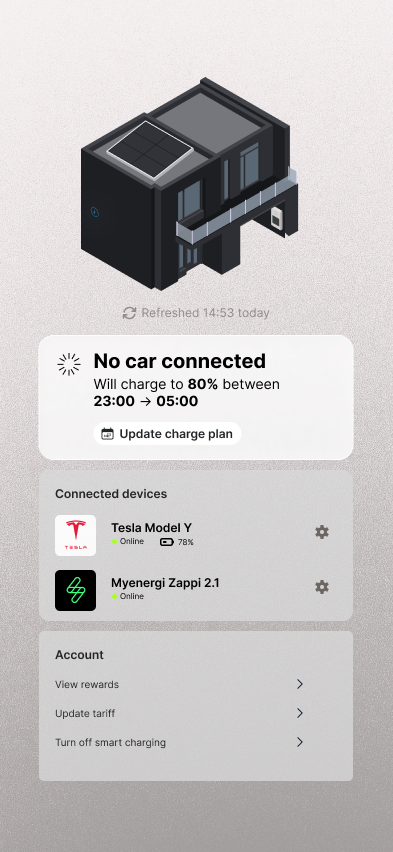
Axle provides a complete hosted smart-charging app that can be added to your existing application as its own page.
With this solution, Axle manages the entire smart-charging flow end-to-end.
 ## Embedding the app
You can either link directly out to `https://smart-charging-sandbox.axle.energy`, or embed the page within a Native app
using a WebView.
Axle will manage onboarding users and controlling their charging.
To connect to a users charger and car, Axle can integrate with your APIs, or Axle also works with Enode to gain
programmatic access to assets.
To see what including Enode in your onboarding flow might look like, see [Integrating with native Enode Link SDK](/components/guides/enode-integration)
## Theming
The app can be styled to match your brand. See the [theming guide](/components/guides/theming) for the full set of design tokens available.
## Authentication
### IFrame
To securely pass tokens into the smart charging application when hosting in an IFrame, use the `postMessage` API.
```
iframe.window.postMessage(
{
type: "axle:token",
token: "",
},
"https://smart-charging-sandbox.axle.energy"
);
```
### Webview
If hosting the Smart charging application within a native application, you can pass in the token as a header in the initial request to `https://smart-charging-sandbox.axle.energy/auth/token`.
This page will securely establish a session, then redirect the customer to the appropriate page (a dashboard or proposition screen)
The Axle hosted app will manage further authentication to Axle APIs.
This example is for iOS, but the approach is similar on Android. If you want integration advice, [get in touch](mailto:support@axle.energy) and we'll happily provide technical guidance
```swift theme={null}
final class ViewController: UIViewController {
private let config = WKWebViewConfiguration()
private lazy var webView: WKWebView = {
return WKWebView(frame: .zero, configuration: config)
}()
override func viewDidLoad() {
super.viewDidLoad()
view = webView
let url = URL(string: "https://smart-charging-sandbox.axle.energy/auth/token")!
var req = URLRequest(url: url)
req.setValue(token, forHTTPHeaderField: "token")
webView.load(req) // Header goes out on this initial request only
}
private let token = "your-one-time-token"
}
```
## Embedding the app
You can either link directly out to `https://smart-charging-sandbox.axle.energy`, or embed the page within a Native app
using a WebView.
Axle will manage onboarding users and controlling their charging.
To connect to a users charger and car, Axle can integrate with your APIs, or Axle also works with Enode to gain
programmatic access to assets.
To see what including Enode in your onboarding flow might look like, see [Integrating with native Enode Link SDK](/components/guides/enode-integration)
## Theming
The app can be styled to match your brand. See the [theming guide](/components/guides/theming) for the full set of design tokens available.
## Authentication
### IFrame
To securely pass tokens into the smart charging application when hosting in an IFrame, use the `postMessage` API.
```
iframe.window.postMessage(
{
type: "axle:token",
token: "",
},
"https://smart-charging-sandbox.axle.energy"
);
```
### Webview
If hosting the Smart charging application within a native application, you can pass in the token as a header in the initial request to `https://smart-charging-sandbox.axle.energy/auth/token`.
This page will securely establish a session, then redirect the customer to the appropriate page (a dashboard or proposition screen)
The Axle hosted app will manage further authentication to Axle APIs.
This example is for iOS, but the approach is similar on Android. If you want integration advice, [get in touch](mailto:support@axle.energy) and we'll happily provide technical guidance
```swift theme={null}
final class ViewController: UIViewController {
private let config = WKWebViewConfiguration()
private lazy var webView: WKWebView = {
return WKWebView(frame: .zero, configuration: config)
}()
override func viewDidLoad() {
super.viewDidLoad()
view = webView
let url = URL(string: "https://smart-charging-sandbox.axle.energy/auth/token")!
var req = URLRequest(url: url)
req.setValue(token, forHTTPHeaderField: "token")
webView.load(req) // Header goes out on this initial request only
}
private let token = "your-one-time-token"
}
```