> ## Documentation Index
> Fetch the complete documentation index at: https://docs.axle.energy/llms.txt
> Use this file to discover all available pages before exploring further.
# Collecting and validating addresses
> Market participation starts with an address we can associate to a meter
To participate in a market, we need to know the [MPAN](https://smartmetercheck.citizensadvice.org.uk/meters/new?fuel_type=electricity) of the user's meter. This is the primary identifier that actors within the electricity system use to identify a consumer of electricity.
This page describes how to collect addresses in a way that allows us to retrieve the MPANs associated with them, and
fall back to asking users for their MPAN directly if necessary.
If you've already collected addresses and would like to retrieve MPANs from them, see [Retrieving meter details](./find-mpan).
# Recommended workflow
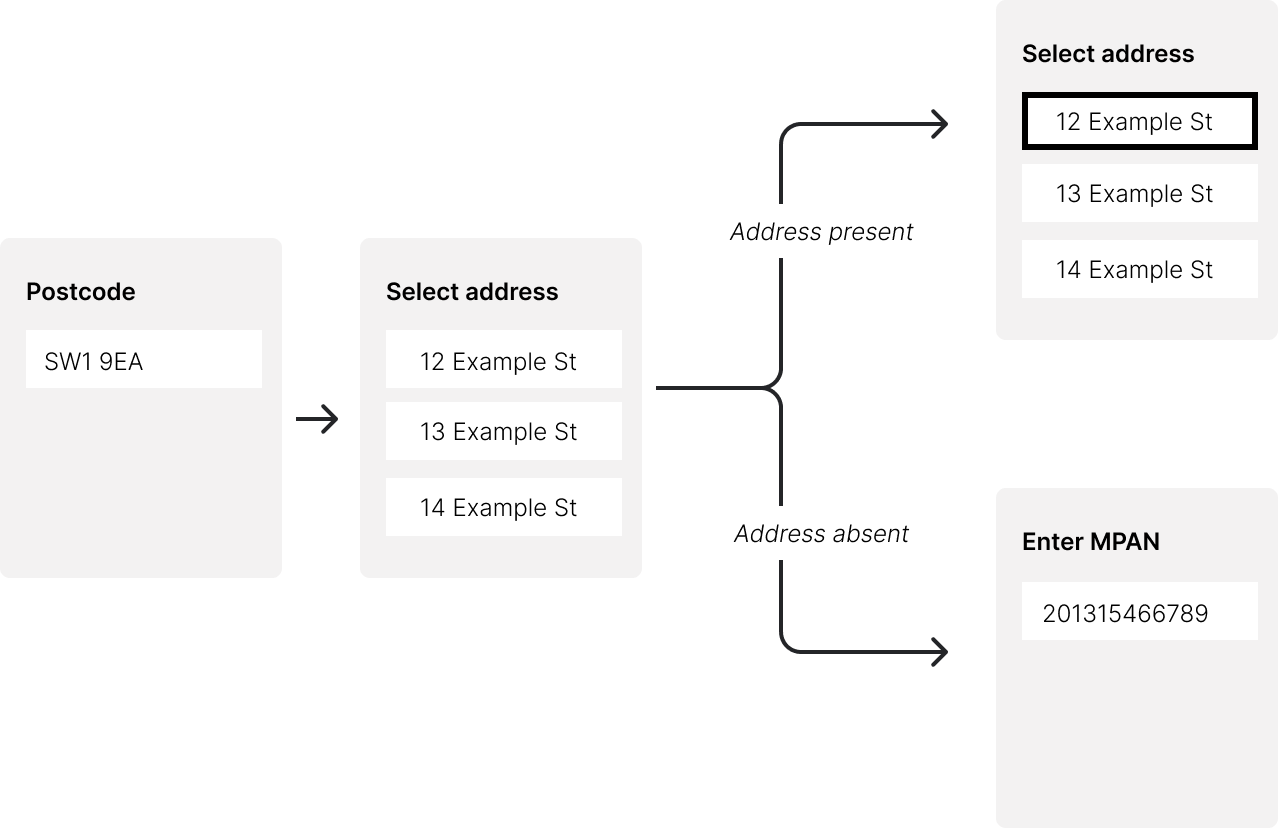 1. Collect the user's postcode
2. Use that to retrieve a list of valid addresses for that postcode
3. Present the user with that list of addresses to choose from
4. If the user's address is not in the list, ask them to enter the MPAN directly
# Implementing address collection
1. Use the [search meters](../api-reference/meter/search) endpoint to search by `postcode`. This returns a list of possible matches.
2. If the user selects an address from the list, you can use the `ref` from that address to retrieve the meter details using the [meter info by ref](../api-reference/meter/get-by-ref) endpoint.
3. If the user does not find their address in the list, you can ask them to enter their MPAN directly. You can validate this MPAN using the [validate MPAN](../api-reference/validation/mpan) endpoint. Once you've collected a valid MPAN, you can retrieve the meter details using the [meter info by mpan](../api-reference/meter/get-by-mpan) endpoint.
You can use our address collection component to streamline collection of valid addresses. This will implement the logic
[described above](#recommended-workflow) and provide a user-friendly interface for your users to select their address.
For more details see the docs for the [Address Collection Component](../components/components/address).
1. Collect the user's postcode
2. Use that to retrieve a list of valid addresses for that postcode
3. Present the user with that list of addresses to choose from
4. If the user's address is not in the list, ask them to enter the MPAN directly
# Implementing address collection
1. Use the [search meters](../api-reference/meter/search) endpoint to search by `postcode`. This returns a list of possible matches.
2. If the user selects an address from the list, you can use the `ref` from that address to retrieve the meter details using the [meter info by ref](../api-reference/meter/get-by-ref) endpoint.
3. If the user does not find their address in the list, you can ask them to enter their MPAN directly. You can validate this MPAN using the [validate MPAN](../api-reference/validation/mpan) endpoint. Once you've collected a valid MPAN, you can retrieve the meter details using the [meter info by mpan](../api-reference/meter/get-by-mpan) endpoint.
You can use our address collection component to streamline collection of valid addresses. This will implement the logic
[described above](#recommended-workflow) and provide a user-friendly interface for your users to select their address.
For more details see the docs for the [Address Collection Component](../components/components/address).